Listen through your iPad speakers.
Play a video, music, or meeting audio on your Mac and hear it through the iPad speakers.
Turn your iPad into an extra display, speaker, and microphone for your Mac. Video, Mac audio output, and iPad microphone input connect over one USB-C cable.
Illustration of a Mac and iPad workspace. Video, audio, and input travel over USB.
Your Mac mini can use the iPad's built-in speakers and microphone. Listen on your iPad and select its microphone as an input on your Mac.
Play a video, music, or meeting audio on your Mac and hear it through the iPad speakers.
Choose iPad Microphone as the audio input in your meeting app or another Mac app that uses a microphone.
Requires the WiredDisplay audio driver on your Mac, included in the DMG. Select iPad Speaker as output and iPad Microphone as input in sound settings or your meeting app.
A host app on your Mac, a client app on your iPad, and one cable that supports data.
Download the Mac host and the iPad app. Install the iPad app by sideloading with AltStore.
Open WiredDisplay on your iPad. On your first connection, match the pairing code on both devices.
Position your iPad display in macOS Displays settings. Move a window onto your iPad and get started.
WiredDisplay lives in your Mac's menu bar. Adjust picture quality, iPad brightness, audio, and input from one place.
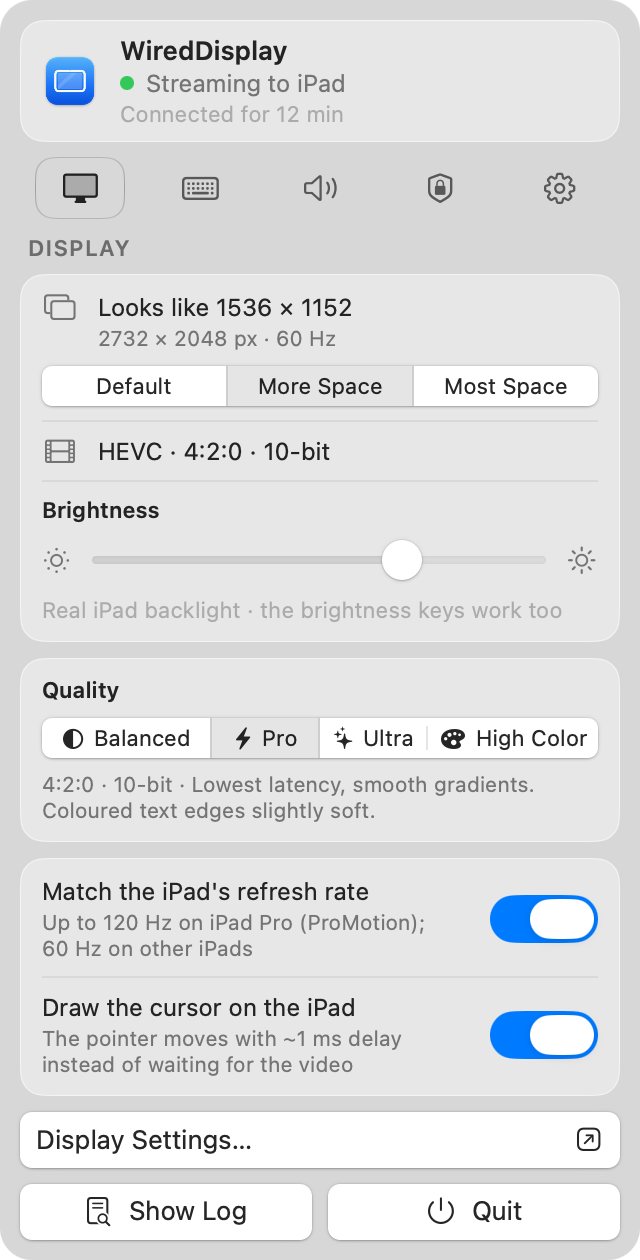
HEVC 4:4:4 modes preserve colour detail around letter edges. Native @2x maps the desktop raster directly to the iPad's panel pixels.
Use the iPad's speakers and microphone with the optional Mac audio driver. Headphone switching is available in the audio panel.
Match the code on your first connection. The connection is authenticated and encrypted. Enable iPad input when you need it.
Choose a desktop size for the task. This example uses the 13-inch iPad Air's 2732 × 2048 panel at 264 PPI.
Native @2x. Each desktop raster pixel matches a panel pixel for maximum sharpness.
Workspace size simulation. In v0.4.2, change the mode in System Settings › Displays. The host panel selector and latest text optimisations are in development.
Download both apps from the same GitHub release, then follow the setup guide.
With a free Apple ID, sideloaded apps need refreshing every 7 days. AltStore can refresh them while AltServer is available.
WiredDisplay video, audio, and input travel over USB. Use a USB-C cable that supports data transfer.
This release distributes the iPad app as an IPA on GitHub for sideloading. The Mac host is distributed as a DMG.
Choose Native @2x to map the desktop raster directly to the panel pixels. More Space and Most Space provide extra room by downscaling the raster. The Native size varies by iPad model.
Refresh rate follows the iPad's capabilities. The tested 13-inch iPad Air runs at 60 Hz. The 120 Hz option requires a ProMotion iPad and still needs physical-device validation.
The iPad keyboard and trackpad are supported through the input option. Enable Allow Input from iPad in the host and grant Accessibility permission on your Mac.
WiredDisplay sends compressed video to the iPad panel. Results depend on the desktop mode, video format, and iPad model. Picture and latency parity with Studio Display have not been established through a direct comparison.
Get started with WiredDisplay v0.4.2 for Mac and iPad.